


How the 2026 Nissan Armada Monolith Display Assists with Driving near Newark, DE
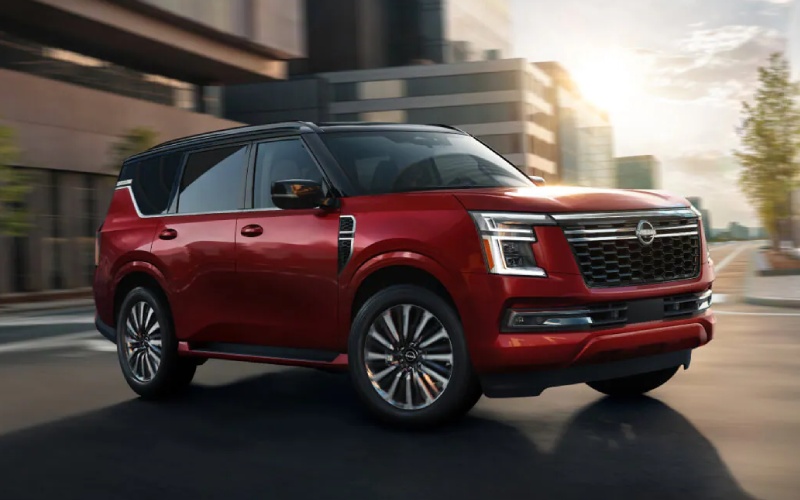
Sheridan Nissan – How the 2026 Nissan Armada Monolith Display Assists with Driving near Newark, DE
Big vehicles make big days easier—especially when the cabin tech feels effortless. The 2026 Nissan Armada® offers a Monolith Display with more than 28 inches of combined, high-resolution screen space across a thin-bezel digital instrument cluster and a wide center touch-screen. The result is intuitive visibility for directions, media, and driver information without clutter or distraction. When paired with available Google built-in, you can say where you want to go and let Google Maps guide you with on-voice commands—no pairing, dongles, or logins required. Families will also appreciate how wireless Apple CarPlay and Android Auto blend smoothly with the Armada’s larger screens, while the available Head-Up Display keeps your eyes forward with key data projected just above the hood.
What sets this interface apart is how it scales for different drivers. Daily commuters see crisp turn-by-turn directions and real-time traffic, while weekend travelers benefit from richer map detail and lane guidance on busy interchanges. The integrated system also works closely with driver assistance, so prompts from available ProPILOT Assist 2.1 feel cohesive—visual cues on the display and gentle alerts in the cluster create a confidence-inspiring loop. Add in the available Klipsch® Premium Audio System, and your playlists and podcasts stay clear over family chatter and highway noise, turning errands or cross-county trips into something more relaxing.
- Quick-glance clarity: The wide, contiguous screens reduce menu-diving and keep key functions accessible with minimal taps.
- Voice-first convenience: With available Google built-in, simply ask for restaurants, fuel, or the fastest route—hands on the wheel, eyes on the road.
- Future-ready updates: Over-the-air capabilities allow select software updates, so your interface can evolve during ownership.
- Family-friendly profiles: Save driver display layouts and cabin preferences so each person feels at home immediately.
Daily living brings unplanned moments: last-minute practice changes, a new coffee stop across town, or a route detour around roadwork. The Armada’s Monolith Display supports those pivots by pairing high-resolution mapping with accessible controls, so even complex junctions feel simple. The 3D Enhanced Intelligent Around View® Monitor can complement that experience in tight parking lots, giving you multiple camera angles right on the main display. If your day takes you off paved roads, Invisible Hood View helps you identify obstacles directly beneath the front end—proof that smart visualization is as useful on trails as it is in town.
As you weigh trims, consider how often you drive with multiple devices or passengers who need to stay connected. NissanConnect® Wi-Fi Hotspot can support several devices at once, and the interface makes switching audio sources or responding to calls intuitive. The goal is a cabin that feels less like a cockpit and more like a seamless, calm workspace for your day—without sacrificing the rugged DNA that lets Armada tow up to 8,500 lbs. when duty calls.
For shoppers comparing family SUVs, it’s worth noting how cabin technology interacts with safety. Standard Nissan Safety Shield® 360 provides crucial assistance, and the Monolith Display helps you understand what the sensors see. It’s signal and context—working together. That’s a major reason many drivers choose Armada for long-term confidence and daily ease. If you’d like to experience the interface firsthand, Sheridan Nissan offers walkthroughs tailored to your routine, including route previews, camera demonstrations, and a quick tutorial on profiles and settings.
Frequently Asked Questions:
Does the Monolith Display change by trim?
Screen sizes and features vary by trim, but every Armada presents a wide, high-resolution layout. Upper trims add richer functionality, available Google built-in, and more advanced visualization.
Is Google built-in different from Apple CarPlay and Android Auto?
Yes. Google built-in integrates services like Google Maps and Google Assistant directly into the vehicle—no phone needed—while wireless Apple CarPlay and Android Auto mirror your smartphone apps.
Can I customize what I see on the instrument cluster?
Yes. Drivers can prioritize turn-by-turn directions, driver assistance prompts, audio info, and more to suit personal preference.
How does display tech help with trailering?
Large, crisp screens make backup guidance and camera views easier to read, and available towing tech—like an integrated Trailer Brake Controller—pairs well with those visuals when lining up a hitch or checking surroundings.
When you’re ready to see how the Armada’s tech supports your life, our showroom team is happy to personalize a demo—serving Wilmington, Newark, and Bear with easy scheduling and flexible appointments. Whether you’re planning road trips, daily commuting, or a mix of both, the Armada’s thoughtful interface helps every mile feel organized and calm.
Visit us to explore the display, test voice commands, and get a feel for how Google built-in, Nissan Safety Shield® 360, and the available Intelligent Around View® Monitor work together in real time. One drive is all it takes to realize how much smoother your day can feel with a cabin designed to simplify. Sheridan Nissan is ready with insights, comparisons, and hands-on support to help you decide which Armada configuration best fits your routine.
0 comment(s) so far on How the 2026 Nissan Armada Monolith Display Assists with Driving near Newark, DE