


How Driver Profiles in the 2026 Nissan Sentra Simplify Daily Driving around Penns Grove, NJ
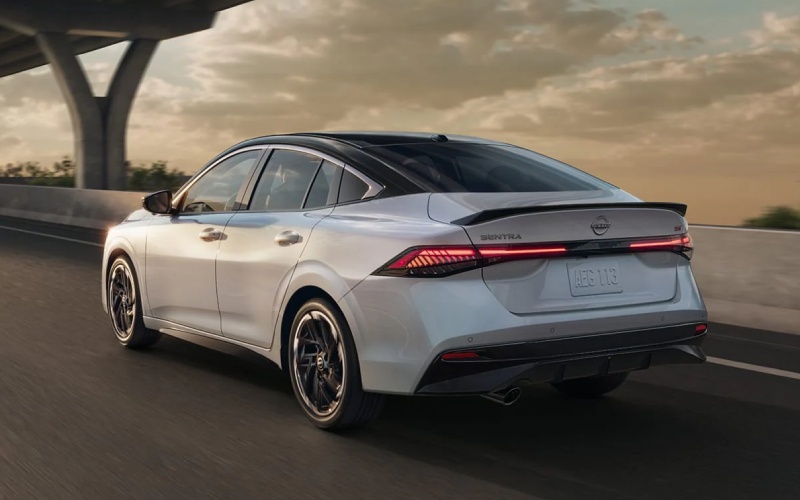
Sheridan Nissan – How Driver Profiles in the 2026 Nissan Sentra Simplify Daily Driving around Penns Grove, NJ
The 2026 Nissan Sentra® is packed with the kind of thoughtful tech that quietly improves every errand and commute, and Additional Driver profiles are a standout. If your household regularly trades keys in Penns Grove, NJ—perhaps one person hops across the Delaware Memorial Bridge for a workday while another handles drop-off and errands later—the Sentra’s personalization tools step in to remove the friction. Up to four Additional Drivers can enjoy their own tailored experience through NissanConnect® Services, so the car feels “set just for you” every time you get in.
What changes? Think of the Sentra as a smart hub that remembers your world. From display layouts on the available monolith dual 12.3-inch screens to connectivity preferences and audio favorites, the Sentra cuts down the small adjustments that eat time at the curb. Tie that together with the MyNISSAN app’s Remote Vehicle Status and Walk Away Status, and you have a sedan that keeps up with your day without constant micromanagement.
How Profiles Help Real Households Share One Car
When you share a compact sedan, preferences pile up fast—screen themes, audio sources, driver-assist settings, even how you like the cabin when you first start up. The Sentra’s approach is simple: make it personal, automatically. After a quick setup, each driver can ease into a familiar environment moments after they enter, so no one has to retool the whole cabin each time. That means fewer taps to switch from podcasts to playlists, less time digging through menus to find a favorite display, and just the right setup for Wireless Apple CarPlay® or Android Auto™ during a busy morning.
- Display preferences: Keep your favorite layouts on the monolith dual 12.3-inch display ready for each driver.
- Connectivity choices: Prioritize Wireless Apple CarPlay® or Android Auto™ and saved Bluetooth devices.
- Audio favorites: Surface playlists, podcasts, or SiriusXM® channels you actually use.
- Assist settings: Save how you prefer features like available ProPILOT Assist to behave on your commute.
- Comfort cues: Use Remote Engine Start with Intelligent Climate Control for “just right” cabin feel.
Because the system keeps your digital world front-and-center, switching drivers feels less like borrowing a car and more like sliding into your own. It’s a small shift that pays off when your schedule is tight and attention is thin.
Set Up Is Straightforward
Getting started with Additional Drivers is refreshingly easy. Using NissanConnect® Services and the MyNISSAN app, each family member can be added and given access. From there, you’ll personalize select settings within the car’s interface—like screen views and preferred connections—and let the system do the rest. If you’ve ever wished your playlists or navigation view were still front-and-center after someone else borrowed the car, this is the feature you’ll appreciate day after day.
Approach Unlock and Walk Away Lock add a polished touch to the experience, too. As you walk up to your Sentra with the key, the car can unlock and greet you, and then lock as you depart. Pair that with Remote Vehicle Status for at-a-glance checks on lock state, tire pressure, and miles to empty, and you’ll cut out the “did I lock the car?” moment before you even sit down to dinner.
Why It Matters Around Penns Grove, NJ
Drivers here often juggle quick hops to the riverfront, errands down Route 49, or commutes across the bridge into Delaware. Those are short, concentrated bursts of busy—and that’s exactly where a connected, profile-savvy cabin takes the stress out of the small stuff. Preload your favorite route to the office, hand off the sedan to a partner who prefers podcast playlists over music, and keep your screens arranged for turn-by-turn maps when you get the Sentra back in the evening. The right information, the way you like it, right when you start the car.
And the experience scales when the day gets longer. The available Bose Premium Audio system brings clarity and presence during highway stints, while ProPILOT Assist helps smooth out stop-and-go traffic on I-295. Profiles ensure you each have the interface set the way you like, so there’s no learning curve, just familiarity and focus.
Tips to Get the Most From Profiles
Spend a few minutes setting up each driver with their must-haves: favorite mapping view, preferred audio source, and go-to connected smartphone. Check that everyone’s logins for apps and cloud services are saved. If you use the myQ® Connected Garage door opener at home, tie it into NissanConnect® Services for an easy exit-and-return flow that syncs with your daily rhythm.
- Prioritize must-use screens: Set primary and secondary views on the monolith display for maps and media.
- Save connections: Pair smartphones and verify Wireless Apple CarPlay® or Android Auto™ preferences.
- Dial in assists: Tweak available ProPILOT Assist sensitivity and following distance to taste.
- Leverage remote tools: Use Remote Engine Start with Intelligent Climate Control for early classes or late returns.
- Use Walk Away Status: Get alerts if a door is unlocked or window is down after you leave the car.
As you refine the setup over a few drives, you’ll find your sweet spot. The goal isn’t to pack in every option—it’s to make the Sentra feel natural the moment you sit down.
Frequently Asked Questions:
How many Additional Drivers can we add to our 2026 Sentra?
You can add up to four Additional Drivers through NissanConnect® Services, so a multi-driver household can share personalized settings with ease.
Do profiles change seat positions or mirrors?
Profiles focus on drive technology and infotainment preferences. For the latest details on seat and mirror memory availability, check the specific trim’s feature list during your test drive.
Does each driver need their own MyNISSAN app login?
Each person should have their own MyNISSAN account and permissions as an Additional Driver. That way, Remote Vehicle Status and personalized settings work as intended for each user.
Can profiles remember my favorite SiriusXM® channels?
Yes. Profiles can streamline your in-cabin audio experience—your go-to stations and sources will surface faster under your profile.
What else makes the Sentra feel personal day to day?
Approach Unlock, Walk Away Lock, Remote Engine Start with Intelligent Climate Control, and the available Bose Premium Audio system round out a cabin that’s truly yours.
If you want to see how seamlessly profiles, the available Monolith dual 12.3-inch display, and NissanConnect® Services come together, schedule a hands-on demo and bring the whole household. Sheridan Nissan is serving Bear and Middletown, DE, and Penns Grove, NJ, with guided walk-throughs that make tech feel intuitive, not complicated. Stop by to set up a profile, pair your phone, and see how quickly the 2026 Sentra becomes “your” car—no matter who drove it last.
Once your profiles are dialed in, daily driving just works the way you expect. Navigation preferences, audio sources, and key assist settings greet you like a familiar workspace. It’s the smarter way to share, the easier way to commute, and the calm you appreciate when the day is already full.
0 comment(s) so far on How Driver Profiles in the 2026 Nissan Sentra Simplify Daily Driving around Penns Grove, NJ